梦想存储罐
 
首页
归档
标签
关于
2020-07-27
2 分钟阅读
github

使用代理加速github

/post/shi-yong-dai-li-jia-su-github/
https://zylikedream.github.io

热度🔥: loading...

因为git默认是不使用系统的代理服务器,即使我们开了梯子,git下载依然很慢,所以需要一些额外配置。这儿我们以windows下的lantern为例

查看代理服务器

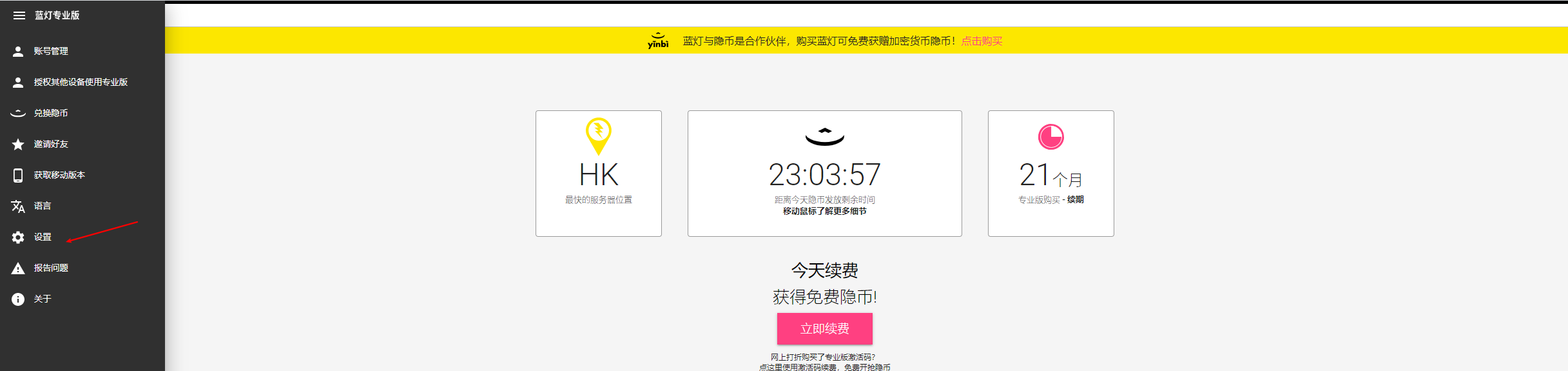
  1. 打开lantern设置
  2. 点击设置
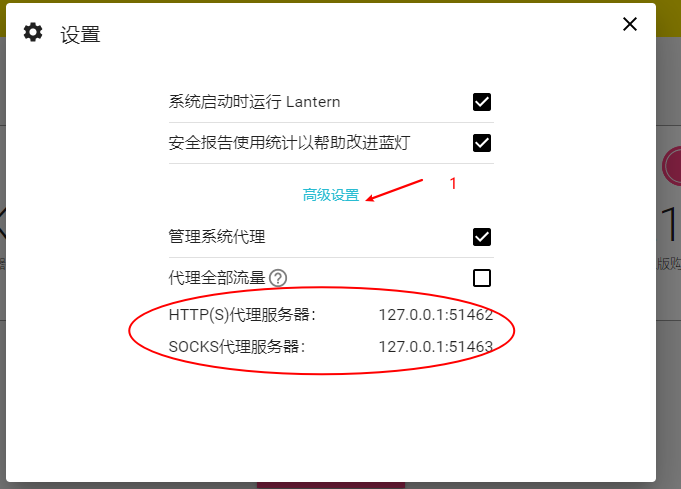
  3. 点击高级设置,查看代理服务器

git配置http代理

用于加速https形式的clone

  1. 设置http代理 用于我们只有从github上clone时才会用到代理,从码云或者自己的git服务器时就不需要了,所以配置时加上域名

    git config –global http.https://github.com.proxy http://127.0.0.1:51462

  2. 设置配置https代理

    git config –global https.https://github.com.proxy http://127.0.0.1:51462

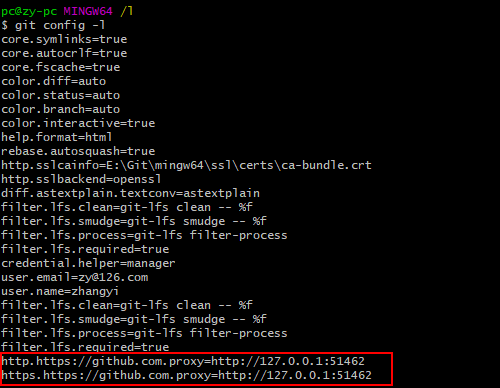
  3. 查看git 配置。 确认已生效

    **git config -l **

  4. 取消配置。如果需要取消使用unset

    git config –global –unset http.https://github.com.proxy

    git config –global –unset https.https://github.com.proxy

配置ssh代理

很多时候我是通过ssh来下载代码,因此还需要为ssh配置代理

  1. 编辑配置文件 vim ~/.ssh/config

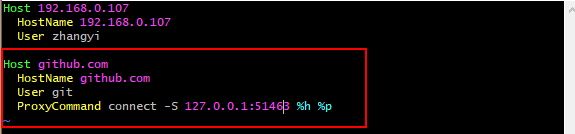
  2. 增加一个github的配置段,为连接github.com时配置lantern的sockets代理

    Host github.com
      HostName github.com
      User git
      ProxyCommand connect -S 127.0.0.1:51463 %h %p
    

linux下的配置

linux下配置整体和上面windows的相同,只是ssh代理里的ProxyCommand connect -S 127.0.0.1:51463 %h %p需要修改为ProxyCommand nc -v -x 127.0.0.1:51463 %h %p

其他梯子

如果使用的是其他梯子原理也相同,只需要找到梯子的代理服务器地址即可

上一篇 ubuntu通过Kubeadmin部署K8s集群
下一篇 C语言结构体对齐

请到客户端“主题--自定义配置--valine”中填入ID和KEY

default
\media\images\custom-bgimage.jpg
梦想存储罐  |
  • 首页
  • 归档
  • 标签
  • 关于
2020-07-27
2 分钟阅读
github

使用代理加速github

/post/shi-yong-dai-li-jia-su-github/
https://zylikedream.github.io

热度🔥: loading...

因为git默认是不使用系统的代理服务器,即使我们开了梯子,git下载依然很慢,所以需要一些额外配置。这儿我们以windows下的lantern为例

查看代理服务器

  1. 打开lantern设置
  2. 点击设置
  3. 点击高级设置,查看代理服务器

git配置http代理

用于加速https形式的clone

  1. 设置http代理 用于我们只有从github上clone时才会用到代理,从码云或者自己的git服务器时就不需要了,所以配置时加上域名

    git config –global http.https://github.com.proxy http://127.0.0.1:51462

  2. 设置配置https代理

    git config –global https.https://github.com.proxy http://127.0.0.1:51462

  3. 查看git 配置。 确认已生效

    **git config -l **

  4. 取消配置。如果需要取消使用unset

    git config –global –unset http.https://github.com.proxy

    git config –global –unset https.https://github.com.proxy

配置ssh代理

很多时候我是通过ssh来下载代码,因此还需要为ssh配置代理

  1. 编辑配置文件 vim ~/.ssh/config

  2. 增加一个github的配置段,为连接github.com时配置lantern的sockets代理

    Host github.com
      HostName github.com
      User git
      ProxyCommand connect -S 127.0.0.1:51463 %h %p
    

linux下的配置

linux下配置整体和上面windows的相同,只是ssh代理里的ProxyCommand connect -S 127.0.0.1:51463 %h %p需要修改为ProxyCommand nc -v -x 127.0.0.1:51463 %h %p

其他梯子

如果使用的是其他梯子原理也相同,只需要找到梯子的代理服务器地址即可

上一篇 ubuntu通过Kubeadmin部署K8s集群
下一篇 C语言结构体对齐

请到客户端“主题--自定义配置--valine”中填入ID和KEY

代码复制成功了哦
https://zylikedream.github.io